
When building a PC, everyone gets excited about the flashy Graphics Card (GPU) or the ultra-fast Processor (CPU). But the Motherboard? It rarely gets the spotlight. It just looks like a confusing piece of plastic covered in metal spikes and weird circuits.
However, choosing the wrong motherboard can completely ruin your PC build. It can bottleneck your performance, limit your upgrades, or simply not fit in your case!
If you are confused by terms like "ATX," "Chipsets," and "LGA 1700," take a deep breath. Today, we are stripping away the confusing tech jargon. We will use simple, everyday examples to help you choose the exact motherboard you need for your specific goals.
Think of the Motherboard as the "Foundation of a House"
To understand what a motherboard does, imagine you are building a house.
Your CPU (Processor) is the homeowner making all the important decisions.
Your RAM is the workbench where tasks are done quickly.
Your GPU (Graphics Card) is the giant flat-screen TV entertaining everyone.
The Motherboard is the Foundation and the Roads of that house. It holds everything together and provides the pathways (wiring) so the homeowner (CPU) can easily talk to the TV (GPU) and the workbench (RAM).
If you build a massive mansion (a high-end CPU and GPU) on a weak, tiny foundation (a cheap motherboard), the house will eventually crack under pressure.
Step 1: Choose the Right Size (Form Factor)
Motherboards come in different sizes, just like houses. You need to pick the size that fits your PC case and your lifestyle.
1. ATX (The Standard Family Home)
What it is: The standard, full-sized motherboard.
Best for: Most gamers, streamers, and video editors.
Why buy it? It has plenty of "rooms" (expansion slots). You can easily plug in multiple hard drives, capture cards, and extra RAM. It’s spacious, making it very easy for beginners to build on.
2. Micro-ATX (The Townhouse)
What it is: Slightly shorter than the standard ATX.
Best for: Budget gamers and standard office workers.
Why buy it? It’s cheaper and fits into smaller, more compact PC cases. You lose a few extra expansion slots, but honestly, 90% of casual gamers will never use those extra slots anyway.
3. Mini-ITX (The Tiny Apartment)
What it is: The smallest option available.
Best for: People traveling, college dorms, or minimalist desk setups.
Why buy it? It is perfect for building a console-sized PC. However, they are harder to build, can get hotter quickly, and usually only have two slots for RAM.
Step 2: Matching the Brand (The Language Barrier)
You cannot mix and match randomly. The processor and the motherboard must speak the same language.
If you buy an Intel CPU, you MUST buy an Intel-compatible motherboard (Look for letters like B760, Z790).
If you buy an AMD CPU, you MUST buy an AMD-compatible motherboard (Look for letters like B650, X670).
Pro Tip: Always check the "Socket Type." Think of it as a lock and key. An Intel CPU needs an Intel "lock" (socket) on the motherboard to snap into place.
Step 3: Which Motherboard is Right for YOUR Workload?
Motherboards are divided into "Tiers" or "Chipsets." Let's break down exactly which one you need based on what you do.
1. The "A-Series" or "H-Series" (The Economy Car)
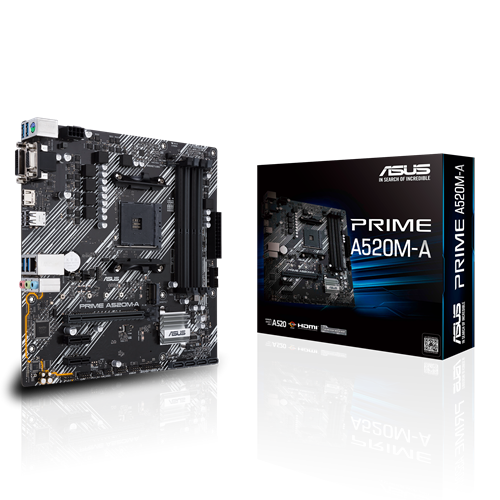
Who is this for? Office workers, students, and extreme budget gamers.
The Vibe: It gets you from Point A to Point B safely and cheaply.
What it does: This is for basic web browsing, writing emails, watching Netflix, and playing light eSports games (like Valorant or League of Legends). It doesn't have fancy cooling armors or crazy speeds, but it does the job perfectly for a tight budget.
2. The "B-Series" (The Reliable SUV - The Sweet Spot!)

Who is this for? 90% of PC Gamers, Twitch Streamers, and Casual Video Editors.
The Vibe: Great performance, comfortable, and has all the features you actually need without ripping you off.
What it does: If you want to play Cyberpunk 2077 or Call of Duty at high settings, this is your board. It allows your RAM to run at top speeds, has plenty of USB ports for your controllers and mics, and offers solid cooling. If you are unsure what to buy, buy a B-Series motherboard.
3. The "Z-Series" or "X-Series" (The Luxury Sports Car)

(Examples: Intel Z790, AMD X670)
Who is this for? Hardcore 4K Gamers, Professional Video Editors (Premiere Pro/After Effects), and 3D Animators.
The Vibe: Expensive, incredibly fast, and packed with features you didn't even know existed.
What it does: These boards are built for "Overclocking" (pushing your PC parts past their factory speed limits). They feature massive power-delivery systems, armor plates to keep things ice-cold, lightning-fast USB-C ports, and multiple slots for ultra-fast SSD storage. If you are building a $2,000+ PC, this is the foundation you need.
Step 4: Checklist Before You Buy
Before clicking that "Add to Cart" button, run through this quick checklist:
Does it have built-in Wi-Fi? (If it has "Wi-Fi" or "AC/AX" in the name, it does. Otherwise, you'll need a cable or a separate adapter).
Does it fit your CPU? (Check if the socket is for Intel or AMD).
Does it have enough USB ports? (Count your mouse, keyboard, headset, and webcam—make sure you have enough holes to plug them in!).
The Bottom Line
Don't overspend on a motherboard if you don't need to! For the vast majority of people building a gaming PC, a standard B-Series, ATX motherboard is the absolute perfect choice. Spend the money you save on a better Graphics Card or more game storage!
🔥 Looking for the Ultimate Ultra-Budget Build or a Quick PC Repair?

If you are trying to revive an older setup, build a dedicated low-cost home media server, or assemble a reliable budget PC for office work and light emulation gaming, you don’t need to drop hundreds of dollars on a modern setup.
Sometimes, all you need is a reliable, rock-solid foundation that gets the basic job done perfectly.
Check out this highly compatible LGA 1150 Micro-ATX Motherboard, which is currently a massive lifesaver for budget builders:
High Compatibility: Full support for Intel Core i3, i5, and i7 processors (4th Gen) to get maximum performance out of budget chips.
Fast Networking: Equipped with a 10/100/1000 Mbps Gigabit LAN onboard for lightning-fast, stable internet browsing and smooth video streaming.
Compact & Efficient: The Micro-ATX form factor means it easily fits into almost any standard or compact PC case without cable management headaches.
If you want to save your cash for other components and grab a reliable, budget-friendly board today, don't miss out on this deal.
👉
🔥 Building the Ultimate High-End Intel PC? Meet the Beast.

Take a look at the enthusiast-grade ASUS ROG Strix Z790-E Gaming WiFi Motherboard:
Ultimate Overclocking Power: Features an advanced power-delivery system and massive heatsinks built to keep high-end Intel Core i7 and i9 CPUs rock-solid under heavy loads.
Next-Gen Future Proofing: Full support for ultra-fast DDR5 memory and PCIe 5.0 slots to handle the fastest graphics cards and NVMe SSDs on the market.
Premium Aesthetics: Equipped with stunning, customizable Aura Sync RGB lighting, built-in high-speed WiFi, and diagnostic Q-Codes for a premium, hassle-free enthusiast build experience.
If you want absolutely zero compromises on raw performance and premium looks, this board is the gold standard.
👉
Post a Comment